 Saily’s regional Europe eSIM kept me connected while visiting Lake Bled on my European train trip this spring.
As someone who travels for eight months of the year, staying connected while abroad is critical. I’ve written about the Pros & Cons of eSIM cards and have been on a mission to find the best eSIM card by testing various ones across the globe.
Last week, I wrapped up a three-month Europe trip across 11 countries where I tested Saily, which is owned by the team behind NordVPN and includes built-in security features. Keep reading for my experience testing Saily in the Azores, U.K., Malta/Sicily and Cape Verde.
Affiliate Disclosure: Please note this is a sponsored post with affiliate links. All opinions are my own. If you make a purchase, I earn a small commission at no cost to you, which goes toward blog maintenance costs. I only recommend products I use.
What’s an eSIM card?
An eSIM card is a digital SIM card that works the same as a physical SIM card minus the hassle of trying to insert anything into your phone. eSIMs are built into most new phones and allow easy switching between providers.
How to Install Saily eSIM on your iPhone
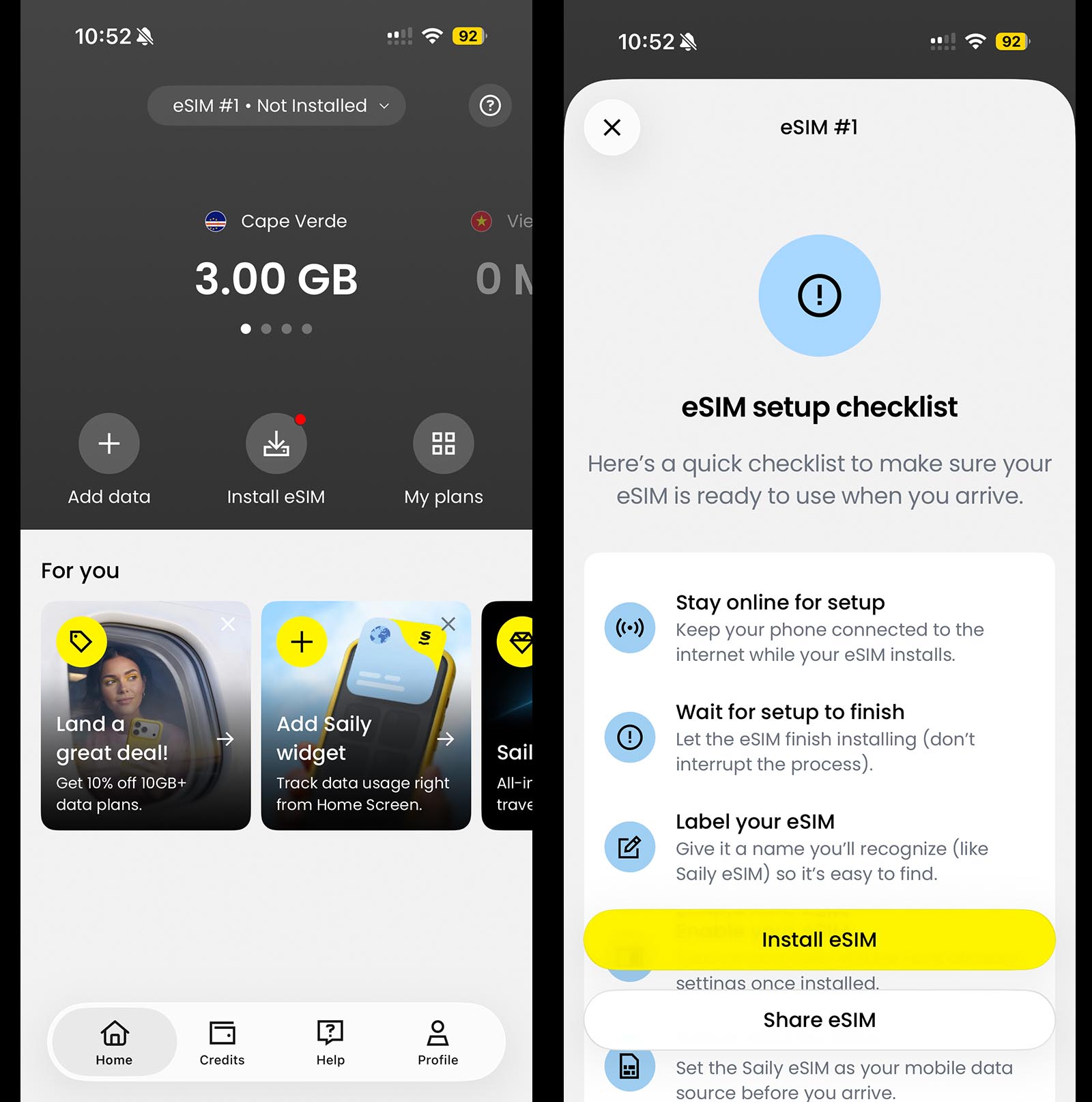 Saily’s eSIM is very easy to set-up and install on iPhones.
While I’ve used Saily previously in Southeast Asia, I got a new iPhone right before this trip, so I had to install it again. The setup was a breeze because all plans work on one eSIM card. Simply download the Saily eSIM app, choose your plan, and it will activate automatically. If you decide to use Saily, use promo code ANNA10 for 10% off your purchase.
To set it up manually, go to “Settings,” tap “Cellular”, tap “Add eSIM,” click on “Use QR code,” and follow the instructions. For more details, check out Saily’s Help website.
Trip Details
Countries Visited: Cape Verde, Portugal, England, Wales, Hungary, Slovakia, Malta, Italy, Slovenia, Croatia, Austria
Usage: WhatsApp for texts, calls and audio messages, navigation apps, Strava to track my runs, uploading video/photos to social media, and using a hotspot to connect to a computer.
I used the following eSIMs: Portugal 3GB for 30 days ($7.99 USD), Europe regional 10GB for 30 days ($35.99) that covers 35 countries and a Cape Verde 3GB for 30 Days ($28.99 USD). Due to my heavy hotspot usage, I went through a lot of data in three months and topped up often. I f you want to try Saily, code ANNA10 saves you 10%. (Yes, I use my own promo codes for purchases!)
Saily in Cape Verde
 Hiking at Pico do Fogo, an active volcano, on Fogo Island in Cape Verde.
Locations Visited: Praia and Fogo
Cellular Network: ALOU
Is 5G supported? Yes, where local networks provide it
eSIM Used:Cape Verde 3GB for 30 Days ($28.99)
My trip kicked off in Cape Verde, a remote independent nation of 10 islands off the western coast of Senegal. Since it was a former Portuguese territory, the easiest way to fly there is through Lisbon, so I planned a one-night layover. I bought a Portugal eSIM for Lisbon and a Cape Verde one .
When I landed in Praia, Cape Verde, my eSIM connected to full LTE on ALOU network instantly. The beautiful thing about Saily is that all plans load to the same eSIM and automatically switch based on my location, which is much easier than installing separate eSIMs.
Cape Verde, like many remote locations, is rarely included in worldwide or regional plans. I work for a travel company, and every coworker bought a worldwide eSIM from another company assuming it covered Cape Verde, but it didn’t. I was the only one who had phone service, especially in Fogo, because I bought a Cape Verde-specific plan. The Ookla app speed test showed 93.8 Mbps download and 31.5 Mbps upload.
Saily in Canary Islands (Spain)
Locations Visited: La Palma & La Gomera
Cellular Network: Movistar, Vodafone & Orange
Is 5G supported? Yes
eSIM Used: Europe 10GB for 30 Days ($35.99 USD)
I visited La Palma and La Gomera on two day trips for hikes. I had 5G service instantly on arrival and used Strava to track my runs. On La Gomera, I had great service in towns but spotty on the drive to hike. When we got to the trailhead, I realized I hadn’t downloaded GPS maps, I quickly downloaded them. Since this was a guided hike, I wasn’t too concerned until our guide got lost, and I used my GPS maps to get us back to the road. Saily to the rescue!
For more details on my favorite hiking apps, check out my post on the best travel apps .
Saily in Portugal: Madeira, Azores and Lisbon
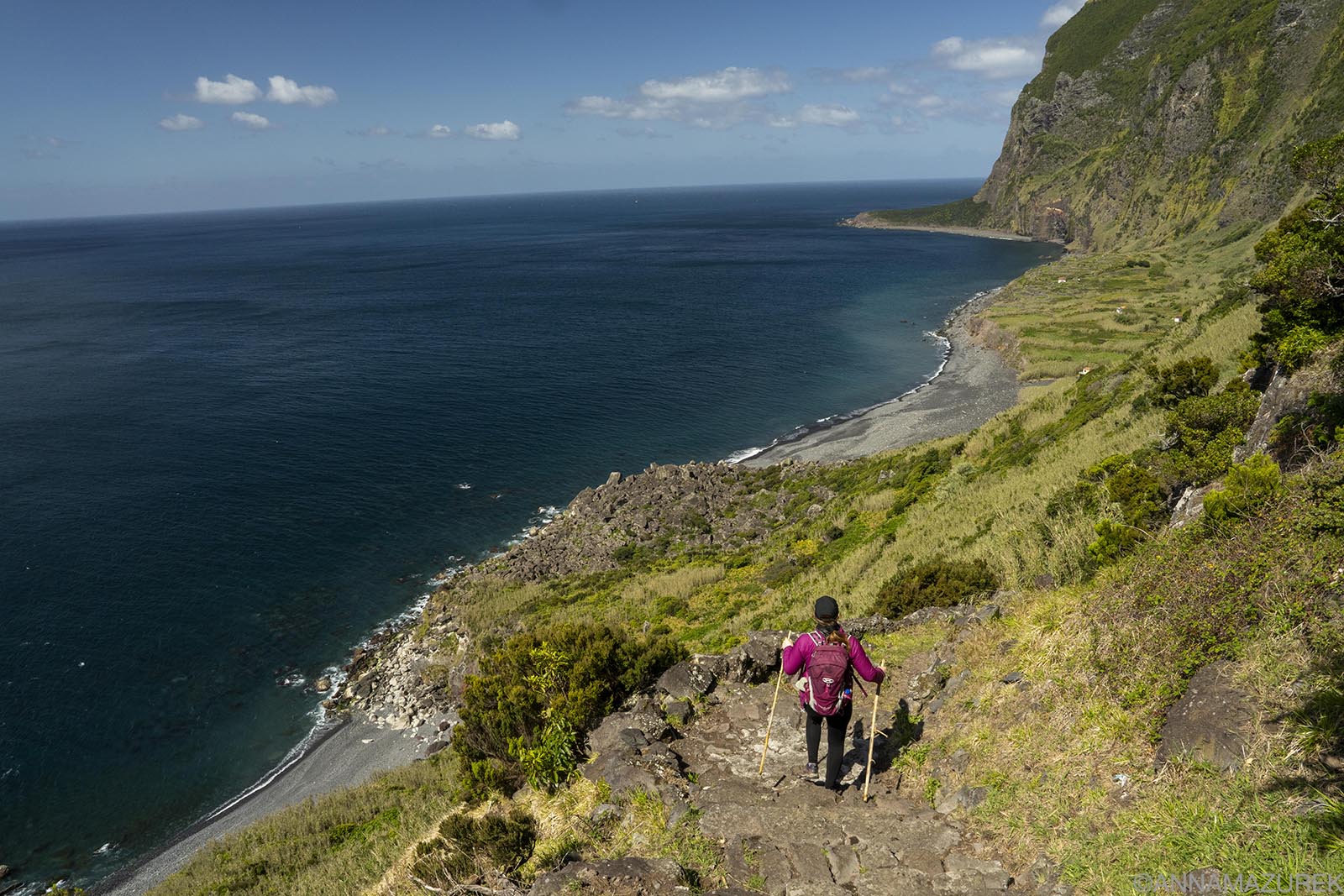 Fajã de Lopo Vaz trail on Flores, one of the two most remote Azorean islands.
Locations Visited: Lisbon, Madeira, Porto Santo, all Azores islands except Graciosa
Cellular Network: NOS
Is 5G supported? Yes
eSIM Used: Portugal 3GB for 30 Days ($7.99) & Europe 10GB for 30 Days ($35.99 USD)
Since Maderia and the Azores are part of Portugal, Portugal eSIMs using the NOS, Vodafone and MEO networks will work here. I used the regional Europe eSIM and had 5G in all locations.
Saily in Madeira
In Funchal, Madeira, I had 5G instantly, and the service connected perfectly for using Strava to track my run and maps to find the best gelato spot in town. (Speed test: 120 Mbps download and 37.7 Mbps upload.) In Porto Santo, I had mostly full bars of 5G driving around the island. (Speed test: 107 Mbps download, 35.2 Mbps upload.)
Saily in Azores
I visited all the Azorean islands, except Graciosa, on this trip. I had excellent 5G coverage on São Miguel, Terceira, São Jorge, Pico, Faial, Corvo and Flores with NOS network. On previous trips, I had great coverage with the NOS network and feel confident that Saily would also work there. If you are planning a trip to the Azores, check out my detailed guide on which islands to visit.
I was hiking almost every day, so GPS apps (Gaia, Maps.me) were important. On some hikes and drives, service was spotty, which is expected. On Pico, I had to arrange transport for a medical issue on a hike, so having service was critical. Speed test in Ponta Delgada, São Miguel: 113 Mbps download and 8.03 Mbps upload.
On Flores and Corvo, I had 5G service everywhere, except the Corvo caldera. On both islands, I had to hotspot to my computer because the Wi-Fi was terribly slow. Due to flight delays, we spent a lot of time working in airports, so the hotspot was a lifesaver.
I spent a week in Lisbon and had 5G service across the entire town and on a day trip to Tomar.
Saily in England & Wales
 Alfred the Traveling Gnome at Conwy Castle in Wales.
Locations Visited: London & Conwy, Wales
Cellular Network: 1Global Network
Is 5G supported? Yes
eSIM Used: Europe 10GB for 30 Days ($35.99 USD)
I flew into London twice on my trip and had great service at both Gatwick and Heathrow. (Heathrow speed test on LTE: 110 Mbps download, 13 Mbps upload). I took the train to Conwy, Wales, where I spent a few days. Service was excellent for Instagramming on my train rides between London and Conwy, Wales. The Wi-Fi was slow at my Airbnb, so I relied on my hotspot.
Saily in Central Europe
eSIM Used: Europe 10GB for 30 Days ($35.99 USD)
I took a Eurail trip from Budapest to Zagreb with stops in Bratislava, Vienna and Lake Bled. I needed an eSIM that would work seamlessly between countries.
Saily in Budapest, Hungary & Bratislava, Slovakia
 Devín Castle lies at the junction of the Danube and Morava Rivers on the border of Slovakia and Austria.
Cellular Network: Yettel HU (Hungary) & O2 Slovakia or Orange Slovensko a.s. (Slovakia)
Is 5G supported? Yes
eSIM Used: Europe 10GB for 30 Days ($35.99 USD)
I had full bars of 5G all over Budapest on the Yettel Hu network. It was the fastest network I’ve tested: 445 Mbps download and 11.7 Mbps upload. The fast service made it so easy to navigate the city and buy bus and train tickets on the BudapestGO app.
On the train to Bratislava, the service was a bit spotty in rural areas. The cell service switched easily between countries with no issues, and I made Instagram stories on the train ride. I had 5G service everywhere in Bratislava and at Devín Castle, located on the border of Slovakia and Austria. (Speed test: 108 Mbps download and 92.2 Mbps upload.) I absolutely loved Bratislava and highly recommend traveling in Slovakia. It was one of the highlights of my Eurail trip.
Saily in Vienna, Austria
Cellular Network: 3 AT
Is 5G supported? I only had LTE.
eSIM Used: Europe 10GB for 30 Days ($35.99 USD)
I was only in Vienna for a night as a logistical stop. I’d been here before, so I didn’t see the need to explore any further. I only had LTE service on the 3 AT network, and speed tests were surprisingly slow.
Saily in Lake Bled, Slovenia
 Lake Bled, Slovenia is one of those places that’s very touristy but worth visiting.
Cellular Network: Telemach
Is 5G supported? Yes
eSIM Used: Europe 10GB for 30 Days ($35.99 USD)
I spent a magical weekend at Lake Bled in Slovenia. It’s a very touristy place but worth visiting. I had 5G service instantly at the border with Austria on the Telemach network. I stayed in the town of Bled but found service was a bit spotty near the opposite end of the lake (less populated area) at times. Mostly, it worked fine.
I did hike to both Osojnica (crowded but best place to get photo of yourself with scenery) and Mala Ojstrica (highest viewpoint with island in center of lake) and had no issues navigating the trail with my service.
Saily in Zagreb, Croatia
Cellular Network: TM 5G
Is 5G supported? Yes
eSIM Used: Europe 10GB for 30 Days ($35.99 USD)
Yet again, I had 5G service without interruption when we crossed the border on the train. The coverage was strong across Zagreb, making it easy to buy bus and tram tickets on Moj Zet, the official transit app. The solid coverage made it easy to navigate and Instagram while I was exploring the town. Speed test: 242 Mbps download and 34.1 Mbps upload.
Saily in Malta & Sicily
 The colorful window boxes of Valetta, Malta.
Cellular Network: Go Mobile (Malta) & Windtre (Sicily)
Is 5G supported? Yes
eSIM Used: Europe 10GB for 30 Days ($35.99 USD)
I spent a month sailing around Malta and Sicily for work in June, so I needed an eSIM that would work in both countries seamlessly. In Sicily, we visited the Valley of the Temples (Agrigento), Erice (service dropped to two bars on the drive up but still works), Marsala and Taormina with overall consisten, strong cell signal.
In Malta, service was great in Valetta, Mdina and on Gozo. Service dropped to LTE when we visited the salt pans on the north side of Gozo, but I still had service when my friend’s didn’t.
Saily Customer Service
I only contacted the 24/7 chat support twice and both times were to ask about refunds when I purchased too much data. (I always buy more than needed, so I don’t run out at an inopportune time.)
With the in-app chat support, you get an AI system as with every company’s customer support nowadays. I automatically asked for a person and got one quickly who confirmed my unused plan would be refunded if it less than 51Mb was used. I contacted them the second time to get a refund once I returned to the U.S. after my trip ended. The refund was handled promptly.
Saily eSIM Review Summary
 The Fisherman’s Bastion is one of the top photo spots in Budapest.
Overall, I’d highly recommend Saily in Europe. Let’s break down the pros and cons.
Pros: Saily works seamlessly between countries. The eSIM is installed once, then you can load multiple plans, and it automatically switches as needed. The regional Europe plan covers 35 countries and was the easiest option because I was country-hopping frequently.
Since I often work remote while traveling, the ability to hotspot to my computer is critical, and Saily did not disappoint! It was also very easy to get a full refund for unused plans with the 24/7 support team.
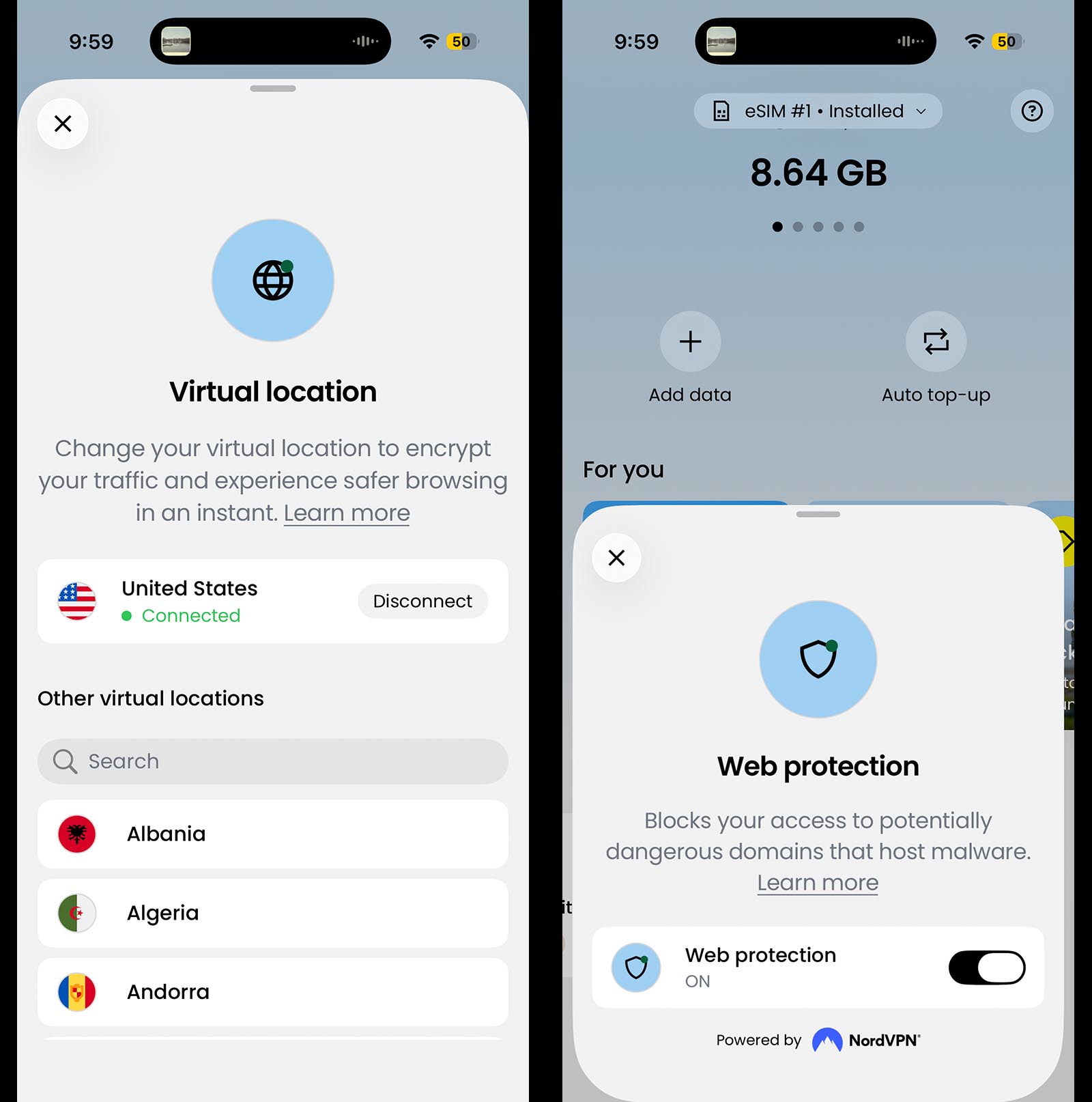 Saily eSIMs include a series of security features from virtual location to web protection.
Cons: The built-in virtual location feature tended to slow data speeds. (In Sicily, the download speed jumped from 65.1 Mbps to 206 Mbps when I turned it off.) The setting appeared to turn on by default, so I had to remember to check it. I’m also not a fan of the ad blocker feature since ads help fund content for smaller creators like me.
To try Saily, use promo code ANNA10 for 10% off your purchase.
Troubleshooting Saily eSIM Cards
If you are having issues with your eSIM card connecting to cellular service, try the following. These have worked well for me.
1. Turn Airplane Mode on and off.
2. Make sure the correct eSIM card is turned on and set as your default line for cellular data.
3. Make sure data roaming is turned on.
4. If you know the network your eSIM is partnered with, turn off “Automatic Selection” and manually choose the network.
5. Toggle between 5G, LTE and the other network speed selections.
6. Turn Airplane Mode on and off again to test everything is working properly.
Refer to Saily’s Help website for further details.